
Section 1. Overview
CLS Ad Slot is a Joomla extension that prevents layout shift (CLS) caused by ad placements by reserving space and controlling how ads are loaded and displayed. It ensures that ad slots remain visually stable while still supporting dynamic ad behavior such as lazy loading and responsive formats.
Built with a modular, event-driven architecture, CLS Ad Slot intelligently handles filled, unfilled, and blocked ads to maintain a clean layout and consistent user experience. It supports multiple ad types—including display, in-article, in-feed, and multiplex—making it a flexible solution for integrating ads without compromising performance or Core Web Vitals.
Section 2. Requirements
CLS Ad Slot requires the following minimum environment:
- PHP 8.2 or higher
- Joomla 5.0 or higher
Ensure your hosting environment meets these requirements before installing the extension.
Section 3. Architecture
CLS Ad Slot is built as a package of coordinated Joomla extensions that work together to manage ad rendering, placement, and behaviour while maintaining layout stability.
Included Extensions
Component (com_clsadslot)
The component provides centralized configuration and a lightweight administrative interface.
- Hosts global settings for the extension
- Displays a dashboard with key system information
- Includes a Status panel summarizing:
- Active modules and ad types
- Enabled plugins
- Basic system readiness indicators
- Designed for quick diagnostics and navigation rather than heavy management.
Module (mod_clsadslot)
The module is responsible for rendering ad slots on the page.
- Outputs the ad container markup
- Supports multiple ad types:
- Display
- In-Article
- In-Feed
- Multiplex
- Defines slot dimensions to prevent layout shift
- Acts as the primary integration point for template positions
Plugins
Plugins extend placement and runtime behaviour.
- System - CLS Ad Slot
- Initializes core JavaScript behaviour
- Loads global CSS
- Manages module event handling
- Content - CLS Ad In-Article Injector
- Inserts ad slots dynamically within article content
- Supports placement rules (e.g, after n number of paragraphs)
- System - CLS Ad In-Feed Injector
- Injects ads into blog/category feeds
- Handles placement rules (after n number of blog items)
Client-Side Layer
A lightweight JavaScript module layer coordinates runtime behaviour:
- Lazy loads ads based on viewport visibility
- Uses an event-driven system to communicate slot slate
- Enables options features such as:
- Collapsing unfilled slots
- Ad blocker fallback handling
This separation ensures that features can be enabled or disabled without tightly coupling logic, keeping the system flexible and performant and implements tree shaking, ensuring that only modules that are required are loaded and executed.
Section 4. Ad Types and Placement
CLS Ad slot supports multiple ad formats and placement strategies, allowing ads to be integrated naturally across different areas of a site while maintaining layout stability.
Display Ads
Standard ads that are rendered through Joomla module positions.
- Placed in template-defined areas (e.g, sidebar, header, footer)
- Best suited for consistent, fixed locations
- Fully controlled via the module settings
- Ideal for responsive or fixed-size ad units
In-Article Ads
These ads are dynamically inserted within article content using the Content plugin.
- Automatically injected at defined intervals between paragraphs (e.g after a number of paragraphs)
- Blends with the natural reading flow
- Helps improve visibility and engagement without manual placement
- Each injected slot maintains reserved space to prevent layout shift.
In-Feed Ads
Ads inserted into blog or category view between content items.
- Injected at intervals within lists of articles
- Designed to match the structure of feed layouts.
- Maintains consistent spacing to avoid disrupting the layout
- Useful for monetizing listing pages
Multiplex Ads
Grid-style ads are typically displayed at the end of content or in larger containers.
- Displays multiple ads in a single unit
- Commonly used below articles or in wide layout areas
- Requires larger reserved space to maintain CLS stability
- Optimized for engagement and session continuation
Placement Strategy
Ad placement is handled through a combination of modules and plugins:
- Modules control fixed-position placements (Display, Multiplex)
- Plugins enable dynamic insertion (In-Article, In-Feed)
This hybrid approach provides the flexibility while ensuring that all ad slots - regardless of placement method - follow the same CLS-safe rendering and loading behaviour.
Section 5. Loading Strategy
CLS Ad Slot uses a lazy-loading, event-driven approach to control when and how ads are requested and rendered. This ensures that ads load efficiently without impacting initial page performance or causing layout shifts.
Lazy Loading
Ads are not loaded immediately on page load. Instead, they are requested only when needed.:
- Triggered when an ad slot enters (or approaches) the viewport
- Uses modern browser APIs (e.g, Intersection Observer)
- Reduces unnecessary ad requests below the fold
- Improves page load speed and Core Web Vitals
Event-Driven Architecture
The loading process is decoupled using a lightweight event system, allowing different features to operate independently.
Typical flow:
- An ad slot becomes visible
- A request event is triggered
- The ad script attempts to load the ad
- A result event is emitted based on the outcome
Example event states:
- init - ad is about to load
- filled - ad successfully rendered
- unfilled - no ad returned
- blocked - ad request prevented (e.g, ad blocker)
Decoupled Feature Handling
Optional behaviours are implemented as independent listeners that respond to events:
- Collapse handler
- Listens for unfilled states
- Collapses the slot gracefully if enabled
- Fallback handler
- Listens for blocked states
- Displays alternative content if configured
Because these features are not tightly coupled to the loader, they can be enabled or disabled without affecting the core loading logic.
Performance Benefits
- Minimizes render-blocking behaviour
- Avoids unnecessary network requests
- Ensures ads only load when likely to be seen
- Maintains consistent layout by working with pre-defined slot dimensions
Why this matters
This strategy allows CLS Ad Slot to balance performance, flexibility, and user experience, ensuring that ads behave predictably under all conditions without introducing layout instability.
Section 6. State Handling
CLS Ad Slot tracks and responds to the outcome of each ad request using a clear set of states. This ensures that every ad slot behaves predictably, regardless of whether an ad is filled, unfilled, or blocked.
Ad States
Each ad slot resolves into one of the following states:
- Filled
An ad is successfully returned and rendered. - Unfilled
The ad request completes, but no ad is returned. - Blocked
The ad request is prevented, typically by an ad blocker or network restriction.
Behaviour Logic
The final behaviour os a slot depends on both its stat and the configured options (collapse and fallback):
| State | Collapse Enabled | Fallback Enabled | Result |
| Filled | -- | -- | Show ad |
| Unfilled | No | -- | Empty space |
| Unfilled | Yes | -- | Collapse slot |
| Blocked | -- | Yes | Show fallback |
| Bocked | Yes | No | Collapse slot |
| Blocked | No | No | Empty slot |
Why State Differentiation Matters
Handling unfilled or blocked states separately allows for more precise control:
- Unfilled ads indicate no inventory is available
- Often best handled by collapsing the slot to reclaim space - Blocked ads indicate the request never completed
- May benefit from showing fallback content instead
This distinction improves both layout behaviour and monetization strategy.
Consistent Layout Behaviour
- All slots begin with reserved space to prevent layout shift
- State handling determines whether that space is:
- Maintained (filled)
- Removed (collapsed)
- Reused (fallback content)
This ensures a stable layout while still adapting dynamically to real-world conditions.
Key Advantage
By combining state awareness with configurable behaviour, CLS Ad Slot provides a level of control that goes beyond basic ad integration, allowing sites to optimize both user experience and ad performance across all conditions.
Section 7. CLS Prevention Strategy
CLS Ad Slot is designed to eliminate layout shift caused by ads by ensuring that space is properly managed before, during, and after ad loading.
Reserved Slot Dimensions
Each ad slot is rendered with predefined dimensions:
- Width and height (or responsive constraints) are set in advance
- Space is reserved before any ad request is made
- Prevent content from shifting when ads load
This ensures that the layout remains stable from the initial render.
Stable Loading Behaviour
The loading process is coordinated to avoid unexpected layout changes:
- Ads are loaded only after the slot is initialized with reserved space
- Lazy loading does not alter layout structure
- No reflow is introduced when ads enter the viewport
Controlled Collapse
When enabled, collapsing is handled in a controlled manner:
- Only triggered after a confirmed unfilled state
- Removes unused space without causing sudden layout jumps
- Collapse is smoothly transitioned using CSS animations rather than a sudden jerk.
Consistent Rendering Model
All ad types - regardless of placement - follow the same rendering rules:
- Module-based and injected ads behave identically
- Layout stability is preserved across articles, feeds, and fixed positions
- Ensures consistent CLS performance site-wide
Result
By combining reserved dimensions, controlled loading, and state-aware behaviour, CLS Ad Slot ensures that ads never introduce unexpected layout movement, helping maintain strong Core Web Vitals and a smooth user experience.
Section 8. Configuration Options
CLS Ad Slot provides flexible configuration at both global and slot levels, allowing you to control how ads are displayed, loaded, and handled under different conditions.
Global Settings (Component)
Accessible via the component dashboard, global settings define default behaviour across all ad slots:
- Client ID
- Unique alphanumeric code used to identify your account (e.g. ca-pub-xxxxxxxxxxxxxxxx)
- Collapse Unfilled Slots
- Automatically remove space for ads that return no content
- Lazy Load Ads
- Enable/disable viewport-based loading
- Ad Blocker Fallback
- Enable fallback content when ads are blocked
- Fallback Content
- Content to load in place of ads if adblocker detected
- Debug Mode
- Displays visual indicators for slot states (filled, unfilled, blocked)
Module Settings (Per Ad Slot)
Slot Configuration
- Ad Unit Type
- Display Ad Unit
- In-Article Ad Unit
- In-Feed Ad Unit
- Multiplex Ad Unit
- Ad Slot ID
- ID provided by AdSense for the particular Ad Unit
- Ad Layout Key
- Only used for In-Feed Ad Units
Layout
- Ad Mode
- Responsive/Fixed Dimensions
- Desktop Min Height (px)
- Minimum height reserved for slots on desktop (Responsive mode)
- Tablet Min Height (px)
- Minimum height reserved for slots on tablet (Responsive mode)
- Mobile Min Height (px)
- Minimum height reserved for slots on mobile (Responsive mode)
- Width (px)
- Width for ad slot (Fixed mode)
- Height (px)
- Height for ad slot (Fixed mode)
Plugin Settings
Plugins control dynamic placement and insertion logic.
Content - CLS Ad In-Article Plugin
- Ad Article Interval
- Number of paragraphs in articles after which an ad will be placed.
System - CLS Ad In-Feed Plugin
- Ad Feed Interval
- Number of content feed items after which an ad will be placed.
Key Benefit
The configuration system is designed to balance ease of use with fine-grained control. allowing you to tailor ad behaviour without compromising layout stability or performance.
Section 9. Dashboard
The CLS Ad Slot component includes a lightweight dashboard designed to provide a quick overview of the system status and easy access to key areas of the extension, including the component's configurations.
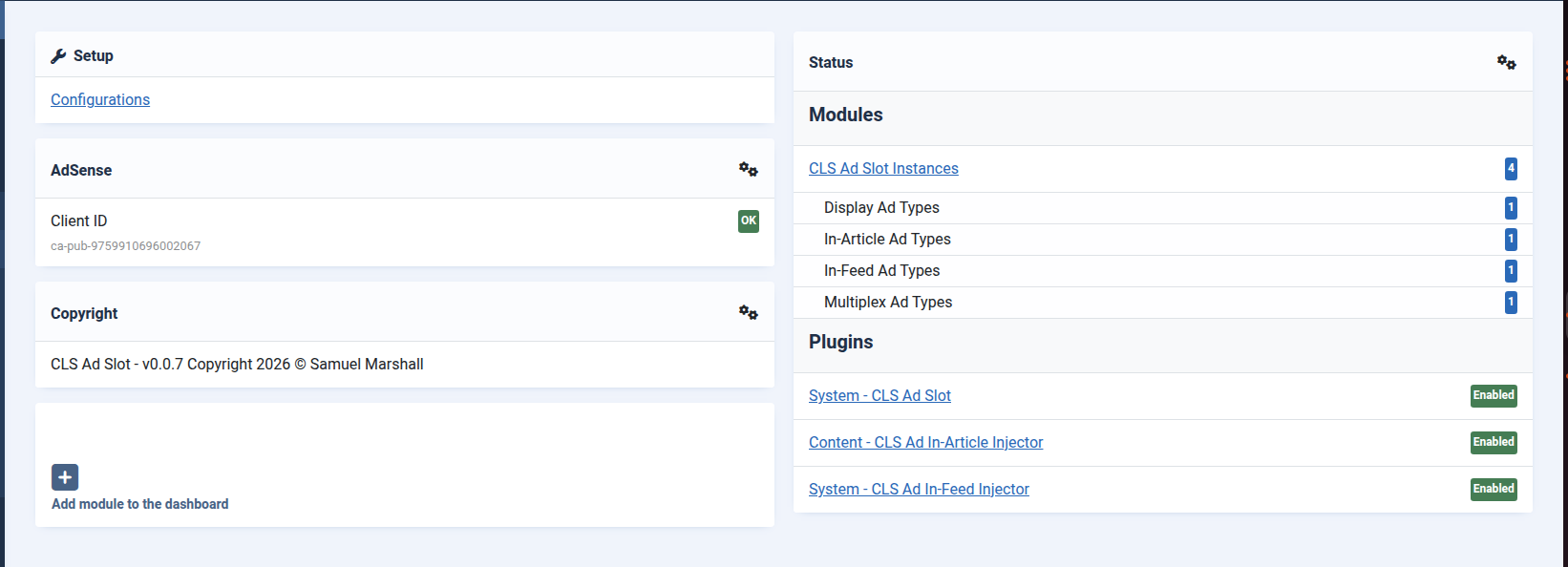
Overview Panels
The dashboard is organized into simple panels that group related information:
Setup
- Provides a link to the component's global configurations
Status
- Displays the overall state of the extension
- Indicates whether required modules and plugins are enabled
- Highlight potential issues or incomplete configurations
- Provides a summary of published ad slot module instances
- Shows statuses of related plugins
- Allows quick access to module and plugin configurations
AdSense
- Displays if required Client ID is configured
Copyright
- Displays extension copyright and version information
Purpose
The dashboard is designed for:
- Quick diagnostics - Identify missing or misconfigured elements
- Navigation - Jump directly to modules, plugins, or settings
- Status visibility - Understand system readiness at a glance
It is not intended for detailed configuration; rather, it serves as a central hub for monitoring and access.
Key Idea
The dashboard keeps management simple by surfacing only the most relevant information, allowing you to quickly verify that your ad setup is complete and functioning as expected.
Section 10. Debugging & Development
CLS Ad Slot includes built-in debugging tools to help identify how each ad slot behaves during loading and rendering.
Debug Mode
When enabled, Debug Mode provides a visual overlay on each ad slot:
- Displays the current state of the slot (e.g., filled, unfilled, blocked)
- Helps distinguish between no-fill and ad blocker scenarios
- Makes it easy to verify placement and behaviour during development.
Visual Feedback
Each slot is annotated in real time, allowing you to quickly identify:
- Whether the ad was successfully rendered
- If a slot remained empty due to no inventory
- If an ad request was blocked before completion
This eliminates guesswork when testing different configurations.
Use Cases
Debug Mode is especially useful for:
- Initial setup - Confirm that all ad slots are loading correctly
- Placement testing - Validate in-article and in-feed insertion points
- Behaviour verification - Ensure collapse and fallback settings work as expected
- Ad blocker testing - Simulate and confirm fallback handling
Development-Friendly Design
- Works alongside the event-driven system
- Reflects actual runtime states without interfering with functionality
- Can be enabled or disabled without impacting production behaviour
Key benefit
Debug Mode provides clear, immediate insight into how each ad slot behaves, making it significantly easier to configure, troubleshoot, and optimize your ad setup.
Section 11. Typical Workflow
Setting up CLS Ad Slot involves preparing your ad units in AdSense and then mapping them to ad slots within Joomla.
1. Configure Ads in AdSense
Before using CLS Ad Slot, your ad units must be created in Google AdSense.
- Disable In-Page Ad Formats
- If using Auto ads, disable In-page formats and Intent-driven formats.
- Prevents AdSense from inserting ads unpredictably, which can cause layout shift and defeat the purpose of this extension
- Create Ad Units for Each Type You Plan To Use
- Display Ads
- In-Article Ads
- In-Feed Ads
- Multiplex Ads
- Collect Required Values
- Client ID - Same across all ad units
- Slot ID - Unique per ad unit
These values are provided in the ad unit code snippet from AdSense. You won't need the snippet; the module will generate these. You only need the values.
2. Configure Global Settings (Component)
In the CLS Ad Slot Component:
- Enter your Client ID (applies to all slots)
- Configure global behaviour:
- Lazy loading
- Collapse unfilled slots
- Ad blocker fallback
- Debug mode (During initial setup)
This established the default behaviour for all ads on the site.
3. Create Ad Slot Modules
For each ad unit created in AdSense:
- Create a new CLS Ad Slot module
- Select the appropriate ad type (Display, In-Article, In-Feed, Multiplex)
- Enter the corresponding Slot ID
- Define slot dimensions to reserve layout space (You can refine these after ads start loading)
- Assign the module to a position (for display ads)
- For In-Article ads, you must assign these to the clsadslot-in-article position
- For In-Feed ads, assign to the clsadslot-in-feed position
Each module represents a single ad slot tied to a specific AdSense ad unit.
4. Configure Dynamic Placement (If using In-Article or In-Feed Ads)
If using automated insertion:
- Enable and configure the Content - CLS Ad In-Article Injector plugin for in-article ads
- Enable and configure the System - CLS Ad In-Feed Injector plugin for in-feed ads
These plugins will insert ad slots based on your defined rules.
5. Test and Verify
- Enable Debug Mode to confirm:
- Ads are loading correctly
- States (filled, unfilled, blocked) are handled as configured
- Test with and without an ad blocker
- Validate layout stability across devices and screen sizes
Summary
- AdSense defines the ad units
- CLS Ad Slot defines the placement and behaviour
By separating these responsibilities, you gain full control over how ads appear on your site without sacrificing layout stability or performance.
Section 12. Best Practices
Following these best practices will help you get the most out of CLS Ad Slot while maintaining strong performance and layout stability.
Define Slot Dimensions
Always specify dimensions for each ad slot:
- Use fixed width/height or responsive constraints
- Ensure space is reserved before ads load
- Prevent unexpected layout shifts
- Refine dimensions after ads load based on the final layout
This is the foundation of CLS prevention
Use Collapse Strategically
Enable Collapse Unfilled Slots where appropriate:
- Ideal for placements with low fill rates
- Helps avoid large empty gaps in the layout
- Especially useful for in-article and in-feed ads
Avoid overusing collapse in critical layout areas where consistency is preferred.
Enable Fallback for Blocked Ads
Ad blockers can prevent ads from loading entirely:
- Use fallback content to retain layout structure
- Provide alternative value instead of empty space
- Particularly useful for high-visibility placements
Avoid Overloading Pages
Adding too many ad slots can reduce effectiveness:
- Impacts performance and user experience
- May reduce fill rates and revenue
- Focus on strategic, high-quality placements
Test Across Scenarios
Always validate behaviour in real conditions:
- With and without an ad blocker
- On different screen sizes
- Across various content lengths
Use Debug Mode to confirm correct state handling
Keep AdSense Auto Placement Disabled
Do not enable automatic in-page placement in Google AdSense:
- Prevents conflicts with controlled placement
- Avoids unexpected layout shifts
- Ensures CLS Ad Slot remains in full control
Key Principle
CLS Ad Slot works best when you control both placement and behaviour intentionally - not when ads are left to automatic systems.
Section 13. JCH Optimize Compatibility
CLS Ad Slot is a standalone extension, but it works well alongside JCH Optimize to improve overall site performance and Core Web Vitals. While JCH Optimize handles asset optimization, CLS Ad Slot ensures that ads do not introduce layout instability.
Recommended Settings
To ensure proper functionality, if you're using the Reduce Unused JavaScript feature in JCH Optimize:
- Exclude or add AdSense Scripts to the Critical JavaScript settings
- Exclude or add CLS Ad Slot Scripts to the Critical JavaScript settings
If excluding, also select ignore execution order for best optimization. These settings can be configured in the JavaScript Section of JCH Optimize.
Why this matters
The CLS Ad Slot extension will still work, but if you enable Reduce Unused JavaScript in JCH Optimize, ads might not load until the user interacts with the page. With lazy load enabled in the CLS Ad Slot component, this further optimization is unnecessary.
Result
With proper configuration, CLS Ad Slot and JCH Optimize complement each other - delivering fast-loading pages with stable, CLS safe ad placements.