
Read the Status Panel
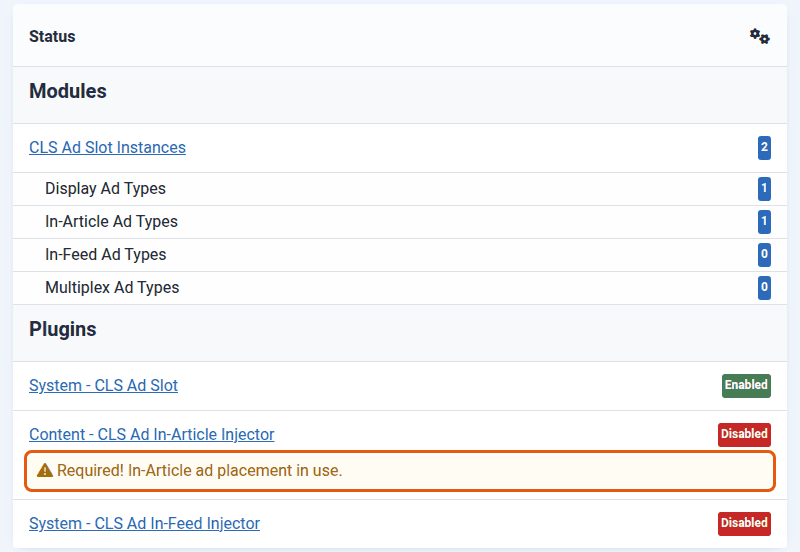
The Status panel on the dashboard counts your published CLS Ad Slot modules by type, and shows whether each of the three CLS Ad Slot plugins is enabled.
Only the System - CLS Ad Slot plugin is needed on every site. The two injector plugins are only needed when you use In-article or In-feed ads, so they are left off until then: a plugin that is off does no work on any page. As soon as you publish a module that needs a plugin that is off, the panel shows a yellow warning under that plugin:
- Required! CLS Ad Slot modules are in use.
-
Under System - CLS Ad Slot. You have published ad modules, but the plugin that makes them work is off. None of your ads will appear until you enable it.
- Required! In-Article ad placement in use.
-
Under Content - CLS Ad In-Article Injector. You have published an In-article module, but nothing will place it in your articles until you enable this plugin.
- Required! In-Feed ad placement in use.
-
Under System - CLS Ad In-Feed Injector. You have published an In-feed module, but nothing will place it in your blogs until you enable this plugin.
-
Click the plugin's name in the Status panel. Joomla's Plugins page opens, showing only that plugin.
-
Click the red cross in the Status column. It turns into a green tick and the plugin is enabled.
-
Go back to the CLS Ad Slot dashboard. The plugin now shows Enabled and the warning is gone.
Tip
The opposite also works. If you stop using In-article or In-feed ads, disable the plugin you no longer need, so it stops running on every page.
On This Page