
Optimize Images Automatically Pro
Instead of optimizing images by hand, you can let JCH Optimize do it in the background: each run optimizes images for a while, then stops and leaves the rest for the next run, until everything is done. New images you add later are picked up by later runs. Images already optimized with your current image settings are skipped, so they don't use your plan's image credits again.
- Joomla
-
JCH Optimize Pro adds a JCH Optimize - Optimize images scheduled task that runs every 30 minutes. It is created disabled, so nothing is optimized until you turn it on.
-
Go to → → and open JCH Optimize - Optimize images. (If you deleted it, click and choose JCH Optimize - Optimize images.)
-
Choose what to optimize in Images to optimize: Images on the site's pages, found by visiting your pages from a Base URL, or Images in folders, the folders you list in Folders. The options left empty use your settings on the Optimize Images tab.
-
Set Status to Enabled and save.
Joomla's scheduler runs tasks when your site has visitors, unless you set it up to run from your server's CRON. When it runs with a visit, each run also stops in time for your server's PHP time limit.
You can also add the jchoptimize:optimize-images command to your server's CRON instead, for example every 30 minutes. Your hosting control panel usually has a Cron Jobs page for this; your host can help. For example, to optimize the images found on your site's pages:
/usr/bin/php /path/to/site/cli/joomla.php jchoptimize:optimize-images --live-site=https://www.example.com/--quietThe Scheduled Optimization panel on the Optimize Images page shows example commands for your own site before the first run. Use the task or the command, not both.
-
- WordPress
-
On the settings page, Optimize Images tab, choose how often in Optimize images automatically (hourly, twice daily or daily). Fill in Email when paused and Notification email if you want to be told when your credits run out. Save.
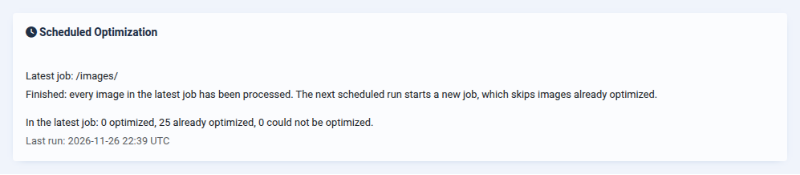
The Scheduled Optimization panel on the Optimize Images page shows how the job is going: whether it is in progress, paused or finished, how many images it has optimized, and when it last ran.
When Your Plan's Image Credits Run Out
Each plan allows a certain amount of image optimization at once, refilled continuously at an hourly rate, with a daily limit. When a run reaches your plan's limit, the job pauses: the images that weren't accepted are set aside, and runs before the time given for retrying do nothing. The first run after that continues the job, starting with the set-aside images. Nothing is lost, and you don't need to do anything.
When a job pauses, or stops because the service refused it (for example, if your account has no plan that includes image optimization), JCH Optimize sends an email at most once a day. It explains why, when optimization will continue, how often it has paused recently, and how the next plan up compares, so you can decide whether a plan with a higher rate suits your site.
On This Page